


Official E-ZPass NY
4.44.50K Reviews
App Specs
- Version
- 3.14.1
- Updated On
- License
- Free
- Downloads
- 1,000,000+
- Developer
- Conduent Incorporated
- Categories
- Travel & Local
- Platform
- Android, iOS
Screenshots
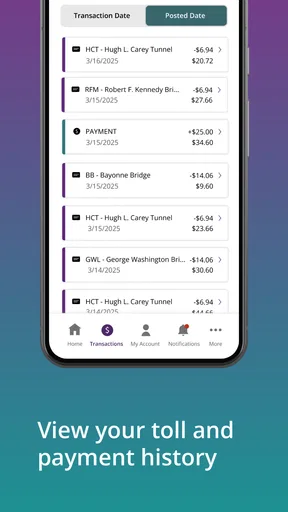
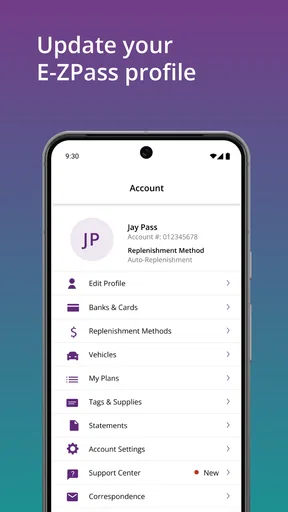
 Analysis by AppCompare
When I’m planning a drive that may involve tolls, I want a quick way to check my E-ZPass account before I leave and a clear place to look afterward if a charge surprises me. The Official E-ZPass NY app is built around those practical tasks, but its usefulness depends on being able to connect when I need account information. I find it most helpful as a companion for managing an account—not as a substitute for navigation or a general travel planner.
Where a connection matters most
The key moments are usually simple: checking an account before a trip, adding funds when needed, and reviewing toll activity after driving. Those are account tasks, so I plan to handle them while I have a dependable connection rather than waiting until I’m already moving or sitting in a weak-signal stretch. The app’s value is less about doing something at the toll point and more about making it easier to prepare and keep track of what happened.
For example, if I’m heading out early, I can check the account before pulling away instead of trying to sort out a balance question from the road. After a drive, reviewing activity can help me connect a toll charge with the trip I just took. I wouldn’t treat a display in an account app as a live route update, though; for directions, traffic conditions, and choosing a route, a navigation app is the better tool.
A useful routine for regular trips
For someone who drives through tolls often, the app can fit into a low-effort routine: check the account before a longer drive, deal with funding or payment details while stationary, then review activity later if a charge needs explaining. That sequence is more dependable than waiting for a reminder at the last minute. It also gives me a chance to notice an account issue before it becomes an interruption during travel.
There’s a practical distinction between account alerts and road alerts. Notifications about an account can help me keep its details current, but they don’t replace checking road conditions or watching signs. I’d keep those jobs separate: use this app for E-ZPass account management, and rely on navigation and official travel updates for what is happening on the route.
When the phone signal is unreliable
A weak connection can turn a quick account check into a delay, so I wouldn’t make the app my only plan for resolving an issue while driving. If a page is slow to load, I’d avoid repeatedly tapping payment controls; I’d wait for a steadier connection and check the account again when parked. That reduces the chance of confusing a delayed response with a completed action.
My safest habit is to handle any balance or payment question before setting off, then leave the phone alone while driving. If something still needs attention after a trip, I can revisit it when I have time and a reliable connection. This is a sensible approach for any account-based travel app, especially when the task involves payment or personal account details.
Worth Reading Before You Choose

EA SPORTS FC Mobile 26 Is a Bigger Football Game, but It Takes Time

Flipboard Shows What News Apps Must Do Beyond the Feed

Switching to Android Auto Means Rethinking Your Driving Routine

Google Calendar Makes a Crowded Week Easier to Manage

Ludo King Makes the Most of the Minutes Between Plans

Baby Panda World Brings Quick Play to Modern Phones, but Its Game Library Feels Busy
Making sensible use of mobile data
Because the app’s main purpose is account access, I’d open it when I actually need to check or manage something rather than repeatedly refreshing it out of habit. On a limited data plan, doing account checks over a trusted connection before or after a journey is an easy way to keep the experience predictable. I’d also avoid handling account details on a public network if I had a more trusted connection available.
One useful trade-off is that keeping an eye on the account can reduce uncertainty, but it still takes a little attention from the user. A notification is a prompt to review a situation, not a reason to assume every account question has been resolved. When a charge or payment needs careful attention, I’d open the account deliberately and confirm what it shows rather than relying on a glance at a notification.
The Onboarding Experience
First things first, setting up the Official E-ZPass NY app is a breeze. Once you download it, you’re greeted with a clean and intuitive interface that even my tech-challenged uncle could navigate. Signing up is straightforward: just enter your E-ZPass account details, and you’re good to go. No more fumbling with passwords or endless verification steps. Trust me, it’s as easy as ordering pizza online.
Features That Stand Out
This app is not just about checking your balance (although it does that well). It’s packed with features that make managing your E-ZPass account feel like a piece of cake. Here’s what I found most useful:
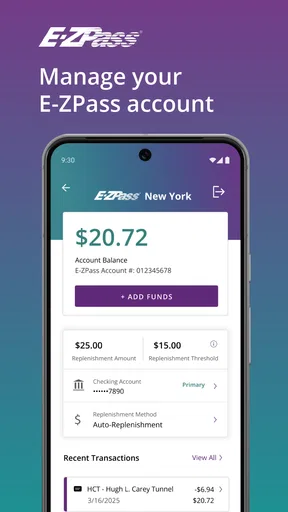
- Real-time Toll Activity: Ever wondered how much that last trip through the Lincoln Tunnel cost you? The app shows your toll usage in real-time, so you’re never left guessing.
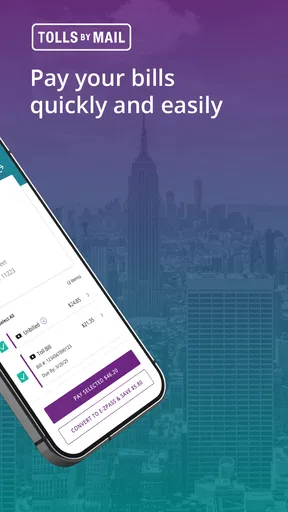
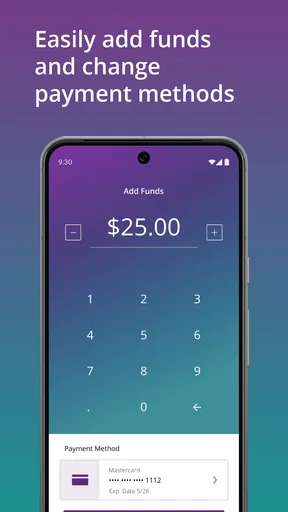
- Payment Management: You can easily add funds to your account with just a few taps. No more stressing about low balances when you’re on the road.
- Account Alerts: Get notified when your balance is low or when it’s time to update your credit card info. It’s like having a personal assistant for your tolls.
User Interface and Design
The design of the app is sleek and modern. Everything is laid out in a way that makes sense, with big buttons and clear labels. I never found myself squinting at the screen or hunting for hidden options. Plus, the color scheme is easy on the eyes, which is a nice touch when you’re checking your balance at 7 AM.
Performance and Usability
In terms of performance, the app is smooth and responsive. I didn’t experience any crashes or slow loading times, even when I was in areas with spotty reception. It’s like the developers knew we’d be using this app on the go, and they’ve optimized it accordingly. Kudos to them!
Who will get the most out of it?
I’d point regular E-ZPass NY drivers toward this app first, especially anyone who wants to keep account checks and payment management separate from route planning. It is also a reasonable choice for an occasional toll traveler who prefers to review account activity after a trip rather than keep track of every toll mentally. The official app comes from Conduent Incorporated, and it sits in the travel-and-local category, though its focus is account administration rather than discovering places or planning holidays.
It is less compelling if you rarely use an E-ZPass account and have no reason to check it between trips. A browser or another account-management route may be enough for someone who only needs an occasional balance check and doesn’t want another app on their phone. And if your main need is avoiding toll roads, estimating a journey, or finding live traffic alternatives, I’d choose a dedicated navigation service instead. This app helps with the account side of driving; it is not a replacement for those tools.
What I’d do before and after a drive
Picture a weekday morning trip that crosses a toll point. Before leaving home, I’d open the app while stationary, check the account, and take care of any funding or payment detail that needs attention. During the drive, I’d keep the phone put away and follow my navigation app and the road signs. Later, when I’m parked and connected, I can look through activity if I want to match a charge to that journey. That division of tasks is more useful than trying to manage everything from the driver’s seat.
A less obvious benefit of that routine is that it gives account questions their own time. If a transaction looks unfamiliar, I can review it calmly rather than make a hurried decision in traffic. I’d note the trip and the charge I’m checking, then revisit the account through a reliable connection. That small bit of organization makes the app more useful without expecting it to explain every part of a journey automatically.
Choosing between the app and other options
Compared with relying on memory, paper notes, or checking an account only when a problem comes up, a dedicated E-ZPass app gives me a single place to review account activity and handle payment-related tasks. Compared with a navigation app, however, it serves a narrower purpose. Navigation tools are better for route choices and traffic; this one is better suited to managing the E-ZPass account itself. I’d use both when a trip calls for both jobs rather than expect either one to cover everything.
The choice also depends on how often you travel through tolls. Frequent drivers have more reason to keep account details close at hand, while someone who takes a toll road only once in a while may find a quick account visit sufficient. The app is free, has an Everyone content rating, and has a 4.3 average from around 14,000 ratings; those figures offer context, but the more important question is whether you regularly need its specific account tools.
Small habits that prevent avoidable friction
I’d make sure I can sign in before a trip where I expect to depend on the account, rather than discovering a login problem at an inconvenient time. I’d also review payment details while parked and allow a little time for account pages to respond when the connection is weak. These are ordinary precautions, but they matter more here than checking the app every few minutes: the useful work is preparation and follow-up, not interaction while driving.
If a balance or activity screen doesn’t appear promptly, I’d first check whether the phone has a stable connection, then try again later instead of assuming the account has changed or that a payment failed. For anything that still looks unclear, I’d use the available account support route rather than repeatedly submitting the same action. That cautious recovery habit is especially worthwhile whenever money or account records are involved.
Why You Should Give It a Go
If you’re already an E-ZPass user, this app is a no-brainer. It takes all the hassle out of managing your account and makes driving through tolls a seamless experience. Plus, the peace of mind you get from receiving instant alerts about your account is priceless.
And hey, even if you’re not a frequent toll traveler, the app is still worth having. It’s free, easy to use, and keeps everything organized in one place. What’s not to love?
All in all, the Official E-ZPass NY app is a solid addition to any driver’s toolkit. It’s user-friendly, reliable, and packed with features that make life just a little bit easier. If you haven’t tried it yet, I’d say it’s about time you do. Your future self will thank you.
My connectivity verdict
For me, this is most worthwhile when I treat it as a connected account tool and build checks into moments when I’m safely parked. A steady connection makes balance, payment, and activity tasks more convenient; a weak one is a good reason to postpone them, not to keep tapping while on the road. The current version is 3.13.2, and the app has passed one million installs, but neither fact changes the basic trade-off: it is a focused companion for E-ZPass NY account management, not an all-purpose travel app.
I’d recommend it to drivers who want a straightforward way to keep tabs on their E-ZPass account, particularly those who use toll roads often enough for advance checks and later review to be useful. I’d skip it if what you really need is live route guidance, or if you hardly ever use an account and prefer not to install a dedicated tool. Used for the right job—and away from the driver’s seat—it makes toll-account chores easier to fit around everyday travel.
Pros
- Convenient toll payment without cash.
- Real-time balance and transaction updates.
- Easy account management via the app.
- Supports multiple vehicles and transponders.
- User-friendly interface with clear navigation.
Cons
- Limited to participating toll locations.
- Requires stable internet for updates.
- No dark mode for nighttime use.
- Occasional login issues reported.
- Limited customer support options.
FAQs for Official E-ZPass NY
What is the Official E-ZPass NY app used for?
The Official E-ZPass NY app is designed to streamline toll payment processes for users in New York. It allows users to manage their E-ZPass accounts, view transaction history, check balances, and replenish funds directly from their mobile devices, ensuring a hassle-free and efficient toll payment experience.
How do I set up my account on the E-ZPass NY app?
Setting up your account on the E-ZPass NY app is straightforward. Download the app, then follow the prompts to enter your account details. You will need your E-ZPass account number and PIN. Once entered, you can access all features, including balance checks and transaction history.
Is the E-ZPass NY app secure for transactions?
Yes, the E-ZPass NY app is built with security in mind. It uses encryption to protect your personal and payment information, ensuring that all transactions and data exchanges are secure. Always make sure you download the app from official app stores to avoid security risks.
Can I manage multiple E-ZPass accounts with the app?
The Official E-ZPass NY app does allow users to manage multiple accounts. You can add multiple tags and manage them conveniently from a single interface, making it easier for families or businesses with multiple vehicles to handle toll payments efficiently.
What should I do if I encounter issues with the app?
If you experience any issues with the E-ZPass NY app, you should first ensure that you have the latest version installed. If problems persist, you can contact E-ZPass customer service directly through the app or visit their website for troubleshooting tips and support.


